🛏️ Room Types – Room & Inventory
Module: Room & Inventory
Section: Room Types
Location: Operations > Room & Inventory > Room Types
Version: 1.0.0
Last Updated: June 2025
🧭 Overview
The Room Types page displays a list of all configured room types within the hotel PMS. It provides details such as room size, amenities, pricing for each day of the week, tax, commission, and room status. Users can edit or delete room types directly from this interface.
🖼️ Interface Preview
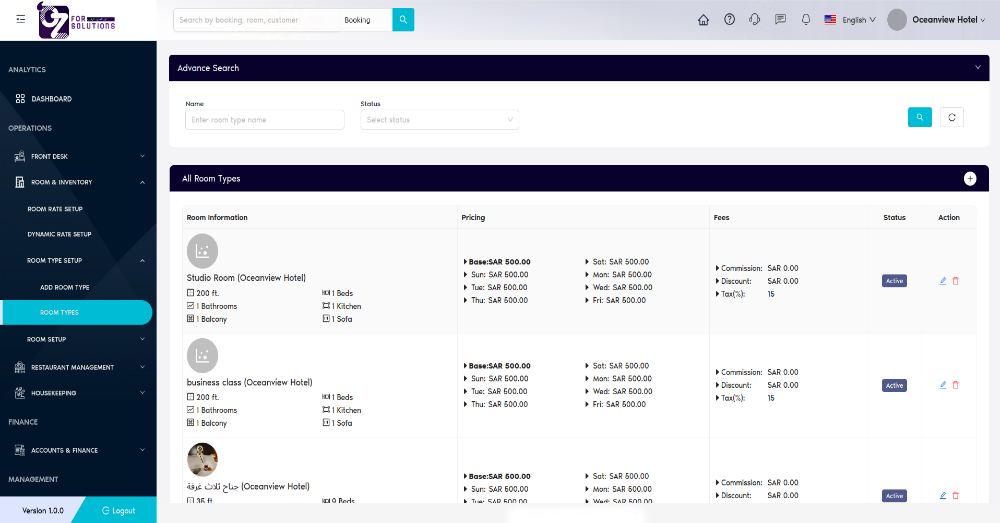
Image: View of all configured room types, including pricing, tax, and basic features.
👤 Who Can Access
| Role | Access Level |
|---|---|
| Admin | Full access |
| Manager | View/Edit/Delete |
| Staff | View only |
🏨 Displayed Room Information
| Field | Description |
|---|---|
| Room Name | Name of the room type (e.g., Studio Room, Business Class) |
| Room Size | Size in square feet (e.g., 200 ft²) |
| Beds | Number of beds available |
| Bathrooms | Count of bathrooms |
| Kitchen | Number of kitchens |
| Balcony | Number of balconies |
| Sofa | Sofa count (if any) |
| Image | Room image or placeholder if not uploaded |
💵 Pricing and Fees
| Field | Description |
|---|---|
| Base Price | Default pricing used unless overridden by daily rates |
| Day-wise Rates | Custom pricing per day (Sat–Fri) |
| Discount | Discount amount (if applicable) |
| Tax (%) | Tax percentage (default shown is 15%) |
| Commission | Commission charged on bookings (e.g., SAR 0.00) |
🟢 Room Status and Actions
| Field | Description |
|---|---|
| Status | Current state of the room type (e.g., Active, Inactive) |
| Edit | Allows modifying existing room type details |
| Delete | Permanently removes the room type from the list |
✅ How to Use
- Navigate to Room & Inventory > Room Types.
- Review the list of available room types with detailed specifications.
- Use the Edit icon to modify any room type.
- Use the Delete icon to remove outdated or unused room types.
- Click the Add Room Type button to create a new room configuration.
❗ Troubleshooting
| Issue | Solution |
|---|---|
| Room not showing in booking | Ensure status is set to Active |
| Incorrect price showing | Verify daily rates override base price correctly |
| Missing room image | Upload a featured image during room type creation |
🔗 Related Pages
📞 Support
For assistance with managing room types:
- Contact your hotel system administrator
- Or email: support@yourcompany.com
Easily manage multiple room types with customizable pricing and feature sets for improved operational efficiency.