🏘️ Rooms – Room & Inventory
Module: Room & Inventory
Section: Rooms
Location: Operations > Room & Inventory > Rooms
Version: 1.0.0
Last Updated: June 2025
🧭 Overview
The Rooms page provides a visual grid of all rooms listed in the PMS, including essential information like room number, occupancy, status, and actions. Users can search, filter, edit, or delete rooms from this central dashboard.
🖼️ Interface Preview
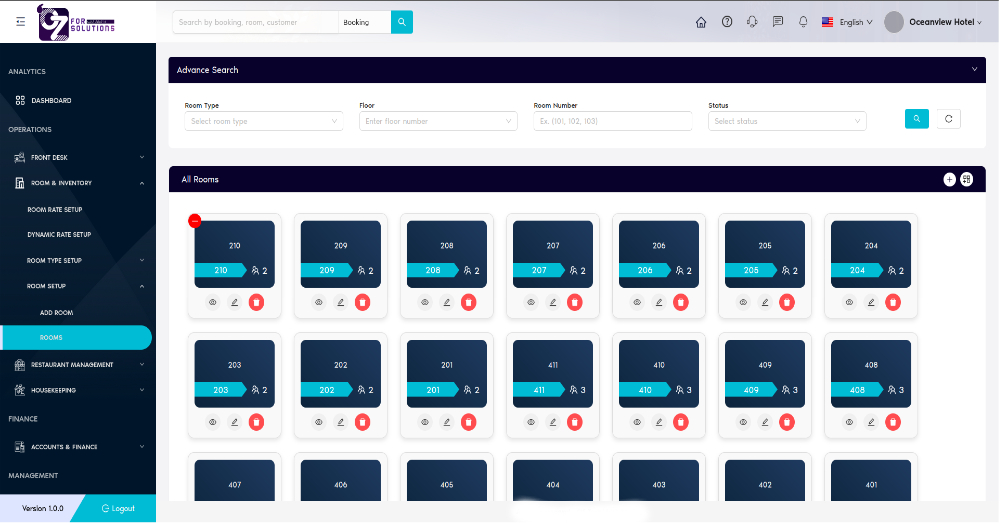
Image: Visual grid showing all rooms with details like number, capacity, and action buttons.
👤 Who Can Access
| Role | Access Level |
|---|---|
| Admin | Full access |
| Manager | View/Edit/Delete |
| Staff | View only |
🔍 Search & Filter Options
| Filter | Description |
|---|---|
| Room Type | Filter rooms based on predefined room types |
| Floor | Filter by the floor number |
| Room Number | Search for a specific room using its number |
| Status | Filter by room status (Available, Maintenance, etc.) |
🏨 Room Card Details
Each room is displayed in a card format with the following information:
| Element | Description |
|---|---|
| Room Number | Displayed prominently on each card |
| Occupancy Icon | Indicates the room’s capacity (e.g., 2 or 3 guests) |
| Status Marker | Color-coded indicator (e.g., red dot for unavailable) |
| Actions | Buttons to Edit, View, or Delete the room |
🛠️ Available Actions
| Action | Icon Description |
|---|---|
| View | Eye icon – View room details |
| Edit | Pencil icon – Modify room configuration |
| Delete | Trash icon – Remove the room |
✅ How to Use
- Navigate to Room & Inventory > Rooms.
- Use filters at the top to narrow down rooms by type, floor, or number.
- Click the View icon to inspect room details.
- Use the Edit icon to update information.
- Use the Delete icon to remove rooms (confirmation required).
- Click the ➕ icon (top-right) to add a new room.
- Click the 📦 Bulk Add Rooms icon (beside the ➕ button) to open the Multiple Room Add page and register multiple rooms at once.
❗ Troubleshooting
| Issue | Solution |
|---|---|
| Room not showing | Verify if filters are excluding it |
| Cannot delete room | Room may be linked to current booking – check status |
| Edit not saving | Ensure all required fields are valid and complete |
🔗 Related Pages
📞 Support
For issues with room listings:
- Contact your hotel system administrator
- Or email: support@yourcompany.com
Easily monitor and manage all room assets visually for efficient inventory tracking and guest readiness.