📈 Dynamic Rate Setup – Room & Inventory
Module: Room & Inventory
Section: Dynamic Rate Setup
Location: Operations > Room & Inventory > Dynamic Rate Setup
Version: 1.0.0
Last Updated: June 2025
🧭 Overview
The Dynamic Rate Setup page allows users to configure flexible room pricing based on demand, availability, and business rules. It helps hotels maximize revenue through automated adjustments while maintaining control over inventory.
Users can view daily pricing across multiple room types and adjust parameters such as base rates, revenue maximizer triggers, and minimum night requirements.
🖼️ Interface Preview
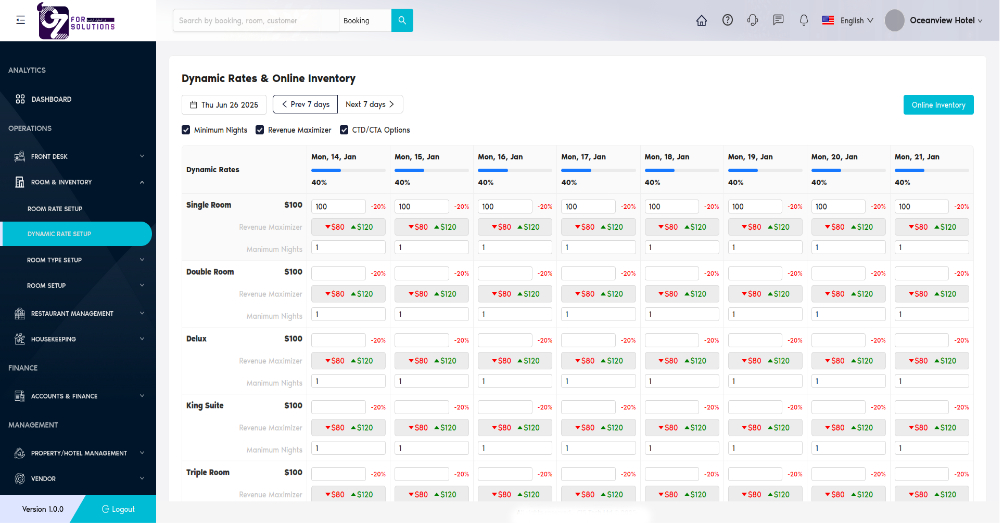
Image: Calendar-based dynamic pricing table showing daily rate adjustments, revenue range, and minimum night stays.
👤 Who Can Access
| Role | Access Level |
|---|---|
| Admin | Full access |
| Manager | View/Edit |
| Revenue Team | Full access |
| Receptionist | View only |
📅 Date Controls
- Use the left/right arrows to navigate weekly ranges.
- Select the current or future start date (e.g., Thu Jun 26, 2025).
- Toggle visibility of:
- ✅ Minimum Nights
- ✅ Revenue Maximizer
- ✅ CTD/CTA Options (Closed to Departure/Arrival)
🛏️ Room Types
| Room Type | Description |
|---|---|
| Single Room | Standard single occupancy |
| Double Room | Two-person capacity |
| Deluxe | Premium room class |
| King Suite | High-end suite with king bed |
| Triple Room | Large room for three guests |
📊 Dynamic Rate Table Breakdown
| Field | Description |
|---|---|
| Base Rate | Default starting price for the room |
| Dynamic Rate (%) | % adjustment applied to base price (e.g., 40%) |
| Revenue Maximizer | Targeted price range (e.g., $80 to $120) to optimize income |
| Min Nights | Minimum nights required for a booking on that day |
All cells are editable and saved automatically upon update.
🔁 Weekly Columns
Each day (Mon, Tue...) shows the adjustable rates for each room:
- Blue bar represents demand or occupancy
- Green/red markers show price range
- Percentage labels (e.g.,
-20%) indicate discount or markup logic
✅ How to Use
- Navigate to Room & Inventory > Dynamic Rate Setup
- Select a date range or use arrows to browse weeks
- Adjust dynamic rates, minimum nights, and revenue targets for each room
- Click "Online Inventory" to sync changes to booking platforms (if integrated)
❗ Troubleshooting
| Issue | Resolution |
|---|---|
| Rates not applying | Ensure "Dynamic Rate Setup" is enabled in system configuration |
| Can't edit certain cells | User role may not have edit permission |
| Revenue Maximizer not working | Check minimum and maximum values are logical and non-zero |
🔗 Related Pages
📞 Support
For issues configuring dynamic rates or syncing to inventory:
- Contact the revenue manager
- Or email: support@yourcompany.com
Use Dynamic Rate Setup to automate pricing strategies and boost profitability based on demand.