🏨 Add Room – Room & Inventory
Module: Room & Inventory
Section: Add Room
Location: Operations > Room & Inventory > Add Room
Version: 1.0.0
Last Updated: June 2025
🧭 Overview
The Add Room page is used to assign and register individual rooms under predefined room types. This interface captures room-specific data like room name, number, location (building/floor), status, detailed description, and associated images.
🖼️ Interface Preview
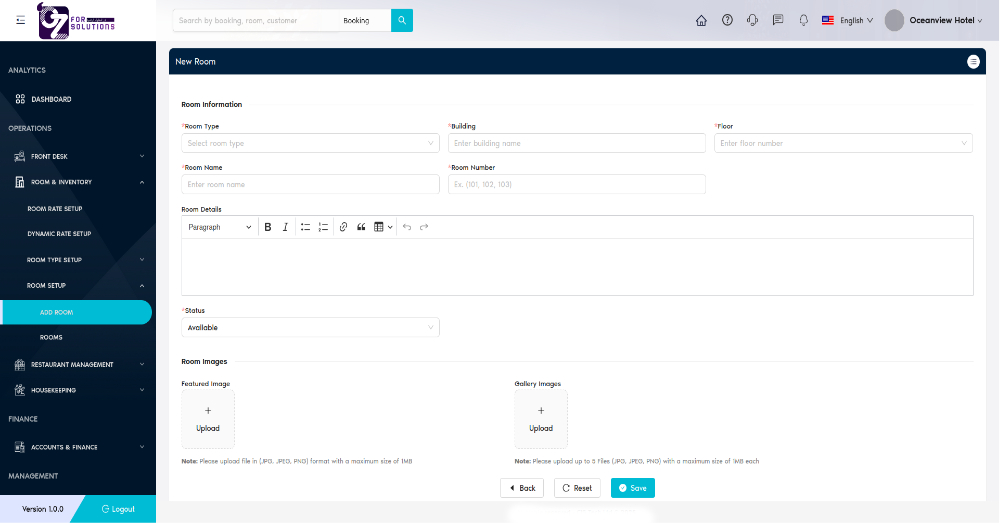
Image: Form for adding individual room details under a selected room type with optional media upload.
👤 Who Can Access
| Role | Access Level |
|---|---|
| Admin | Full access |
| Manager | Add/Edit |
| Staff | View only |
🏨 Room Information Fields
| Field | Description |
|---|---|
| Room Type | Dropdown to select an existing room type |
| Room Name | Name or identifier of the room (e.g., Ocean View Deluxe 101) |
| Room Number | Unique number of the room (e.g., 101, 202, etc.) |
| Building | Enter the building name housing the room |
| Floor | Select the floor number |
| Room Details | Rich text box for detailed description of room amenities/features |
| Status | Dropdown to set room status (e.g., Available, Maintenance, etc.) |
📁 Room Images
| Field | Description |
|---|---|
| Featured Image | Upload one main image representing the room (JPG/PNG, max 1MB) |
| Gallery Images | Upload up to 5 gallery images (JPG/PNG, max 1MB each) |
✅ How to Use
- Navigate to Room & Inventory > Add Room.
- Select an existing Room Type.
- Fill in room name, number, building, and floor.
- Provide a detailed description in the Room Details field.
- Set the room Status.
- Upload a Featured Image and optional Gallery Images.
- Click Save to complete room registration.
❗ Troubleshooting
| Issue | Solution |
|---|---|
| Cannot save room | Ensure all required fields (e.g., Room Name, Room Type) are filled |
| Image not uploading | Ensure image file type is JPG, JPEG, or PNG and ≤1MB |
| Room number conflict | Use unique numbers for each room within the hotel |
🔗 Related Pages
📞 Support
For help adding or managing rooms:
- Contact your hotel system administrator
- Or email: support@yourcompany.com
Use the Add Room page to populate your hotel’s inventory with individually configured rooms for more accurate room-level tracking and availability.